Comparison
The best home inventory apps for iPhone, compared
We make Remio, one of the apps on this list, so read this with that in mind. Everything below about the other apps comes from their own App Store pages, Google Play listings and websites, checked on 16 November 2026. Where a store page does not say something, the table says "not stated" rather than guessing. The sources are listed at the end.
The short answer
- For insurance, estate and household records on iPhone, iPad and Mac: Under My Roof. It is the most complete of the seven and an App Store Editors' Choice.
- For a household that also uses Android or a web browser: Itemtopia, which runs on all three and supports several users.
- For a business, a workshop or a stockroom: Sortly. It is built for teams and barcode labels, and priced for businesses.
- For finding things at home, with no account: Remio. Photograph a thing, the AI suggests a name, say where you put it, and search for it later. Everything stays on the phone.
- For a small list and a single payment: WhereMate or Nestmer, both with a $9.99 one-time unlock.
Side by side
| Free limit | Paid (US App Store) | Account | Names items from a photo | Barcode scan | Export | Platforms | |
|---|---|---|---|---|---|---|---|
| Remio | 50 things, 5 AI scans a month, 5 moving boxes | $3.99 a month, $24.99 a year or $79.99 once | Not needed | Yes | No | PDF list, Excel file, QR contents labels | iPhone |
| Under My Roof | 10 items | $4.99 a month or $34.99 a year | No third-party account; optional iCloud sync | Yes, with Apple Intelligence (iOS 27) | Yes | CSV, PDF reports | iPhone, iPad, Mac |
| Itemtopia | 20 items (stated on Google Play) | $7.99 a month or $79.99 a year, extra users cost more | Cloud account | Not stated | Yes | PDF and CSV (Premium) | iPhone, iPad, Android, web |
| Sortly | 100 items, 1 user | Advanced from $24 a month billed yearly in the first year | Cloud account | Not stated | Yes | CSV, XLSX, PDF | iPhone, iPad, Android, web |
| WhereMate | 5 things | $9.99 once | Not needed | Suggests names on the device | Not stated | QR labels as PDF | iPhone, iPad |
| WhereIs | 3 items | Item packs, up to $9.99 for unlimited | Not stated; iCloud sync | Yes | Not stated | Not stated | iPhone |
| Nestmer | 40 items, 2 floors | $9.99 once; shared cloud homes $9.99 or $19.99 a month | Only for cloud homes | Not stated | Not stated | Not stated | iPhone, iPad |
"Not stated" means the app's own pages do not mention it. The feature may still exist, so check the store page if it matters to you. Prices are the US prices listed on each App Store page and differ by country.
What to decide before you pick one
Home inventory apps answer two different questions, and most lean towards one of them.
- "What do I own, and what is it worth?" This is the insurance and estate question. You want values, receipts, serial numbers, reports and a copy that lives outside the house. Under My Roof, Itemtopia and Sortly are strong here.
- "Where did I put it?" This is the everyday question. What matters is how fast one entry takes and how quickly a search gets you to the shelf. Remio, WhereMate and WhereIs are built around it.
Then three practical checks. Does the free limit cover your first week of use? Do you want an account and cloud sync, or would you rather the list stayed on your phone? And does anyone else in the house need to edit the same inventory?
Remio
Remio is built for the everyday question. You photograph a thing, the AI suggests a name, and you say where it lives: a room, a shelf, a box, or the friend you lent it to. Later you search, or ask the built-in assistant "where is the drill?", and it takes you to the spot.
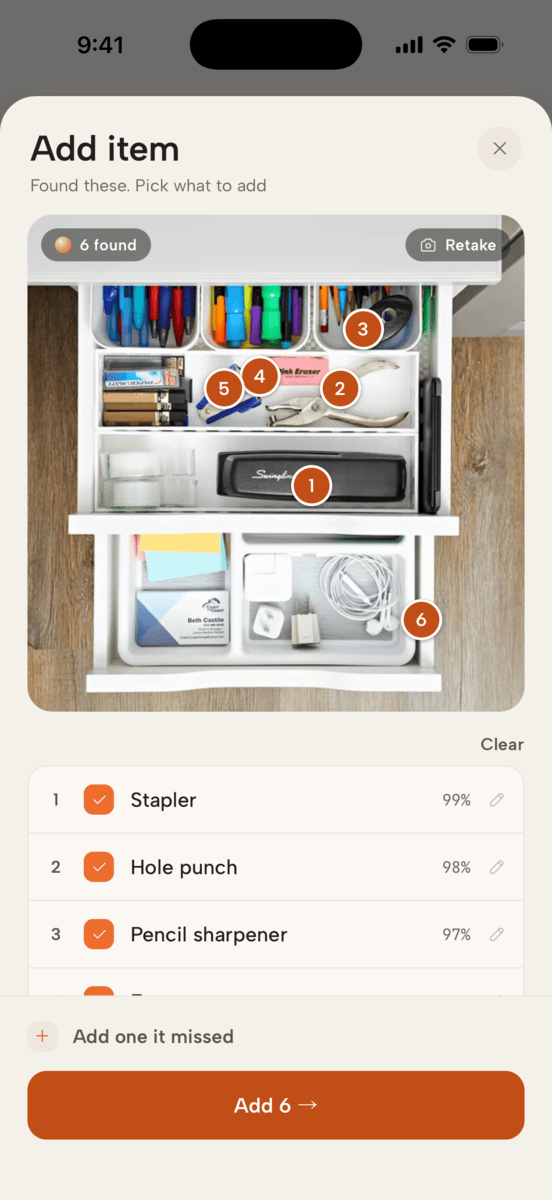
- No account, on the device. No server holds your inventory. "Identify with AI" sends a single photo to suggest a name and the photo is not stored. Adding by hand works offline.
- Moving mode. Numbered boxes, printable labels, a read-only list you can send to helpers, and unpacking into the new home.
- Reminders. Warranties about to end, things you lent out, low stock and food about to expire.
- Export. Any spot, from one box to the whole house, leaves as a printed list, an Excel file or a sheet of QR contents labels.
- Nine languages. Items the AI names can be found by searching in any of them.
Where it falls short: it is iPhone only, with no Android or web app. It does not scan barcodes. It does not sync between devices or let several people edit one inventory. And it is new, so it has few ratings on the App Store yet.
Under My Roof
The most complete home inventory on Apple platforms, with native apps for iPhone, iPad and Mac. It covers insurance coverage analysis, warranties, maintenance schedules, moving boxes and estate planning with heirs, and it scans UPC, EAN and ISBN barcodes. Data stays on your devices, with optional sync through your own iCloud, and it can be shared with other people in the household. Photo identification with Apple Intelligence is new and needs iOS 27 on a supported device.
Good fit if you want a thorough record for insurance or estate purposes and use more than one Apple device. Less of a fit if 10 free items is too few to try it properly, or you only want to remember where things are.
Itemtopia
Itemtopia runs on iPhone, iPad, Android and the web, which makes it the obvious choice for a household that does not all use Apple devices. It has warranty reminders, barcode and QR labels, PDF and CSV reports for insurance and estates on Premium, and invites for family members with permissions. An AI assistant helps estimate value and answer maintenance questions. It works with a cloud account.
Good fit if you need several people and several platforms on one inventory. Less of a fit if you would rather not keep your inventory in someone else's cloud.
Sortly
Sortly describes itself as an inventory tracker for business, and its pricing reflects that: the free plan covers 100 items and one user, and paid plans start with Advanced, listed at $49 a month and shown at $24 a month billed yearly for a customer's first year. It is strong at barcode and QR labels, team access, low stock alerts and CSV, XLSX and PDF reports. Plenty of people use it at home too. We wrote a separate page on Sortly alternatives for home use.
WhereMate
A small app with a clear idea: places hold boxes, and boxes hold things. You add items by voice, typing or photo, it prints QR labels for boxes, and it needs no account. The first five things are free and a $9.99 one-time purchase unlocks the rest. Its privacy policy says photo analysis on the device suggests names.
WhereIs
An iPhone app for finding things at home. AI reads a photo and fills in the name, category and location, and the inventory syncs through iCloud. Three items are free; after that you buy item packs, with $9.99 for unlimited.
Nestmer
Nestmer maps your home by floor, room, closet, shelf and drawer. It is free for two floors and 40 items, with a $9.99 one-time Pro upgrade. Shared homes for three or six people are a separate monthly subscription, and those need an account. Local use does not.
Try Remio with your own things
Everything is unlocked for the first 7 days, and the free version keeps up to 50 things after that. No account, nothing to set up first: photograph the first thing you keep losing and tell Remio where it lives.
Get Remio on the App StoreQuestions people ask
What is the best home inventory app for iPhone?
Is there a free home inventory app?
Which ones work without an account?
Which ones name items from a photo?
Sources
Checked on 16 November 2026. Prices are from the US App Store unless noted.
- Remio: App Store
- Under My Roof: App Store, FAQ
- Itemtopia: App Store, Google Play, itemtopia.com
- Sortly: App Store, sortly.com/pricing
- WhereMate: App Store, privacy policy
- WhereIs: App Store
- Nestmer: App Store
Something out of date? Write to [email protected] and we will correct it.